Gold casting software
Gold and silver casting software for job-work units
Enter a casting order the way you write a job card. Parthavix works out fine weight, wastage and labour line by line, and posts gold, silver and cash to the client’s ledger separately.
Free during early access. Write to us and a person will reply.
Fine weight, worked out the trade way
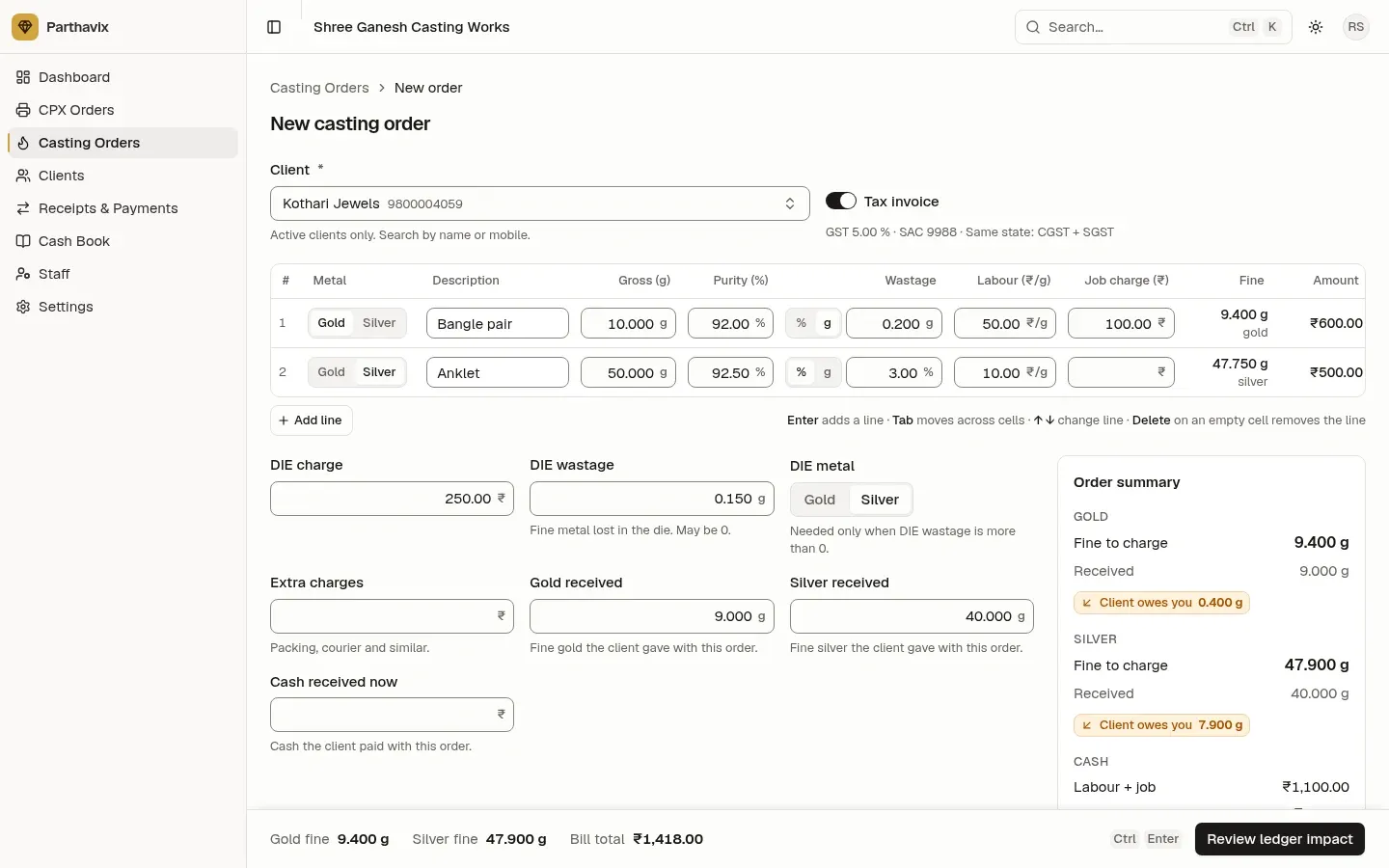
Purity and wastage are both applied to the gross weight, the way casting units already calculate it. Every line is rounded on its own, so totals always add up.
| Gross weight | 10.000 g |
|---|---|
| Purity | 92.00 % |
| Wastage | 0.200 g |
| Fine gold (9.200 g + 0.200 g) | 9.400 g |
| Labour ₹50.00/g on gross | ₹500.00 |
| Job charge | ₹100.00 |
| Amount | ₹600.00 |
| Fine gold charged | 9.400 g |
|---|---|
| Gold received | 9.000 g |
| Gold the client owes from this order | 0.400 g |
| Cash bill (no GST) | ₹600.00 |
| As a tax invoice with GST at 5 % | ₹630.00 |
The details casting units care about
Wastage in % or grams, per line. Your company setting decides the default, but each line can switch between a percentage of gross weight and a fixed weight in grams. Gold and silver each have their own default wastage % and purity.
DIE charge and DIE wastage. Add a DIE charge in rupees and DIE wastage in grams. When there is DIE wastage you choose the metal it belongs to, so it is added to gold or silver, never both.
Gold, silver and cash received. Record the metal and cash the client hands over with the order. The summary shows what the order adds to, or takes from, each balance before you save.
Status from pending to delivered. Each order moves Pending → Casting → Completed → Delivered, one step at a time, with who moved it and when. Casting staff can move orders; only the owner or a manager can cancel.
See the exact gold, silver and cash before you save
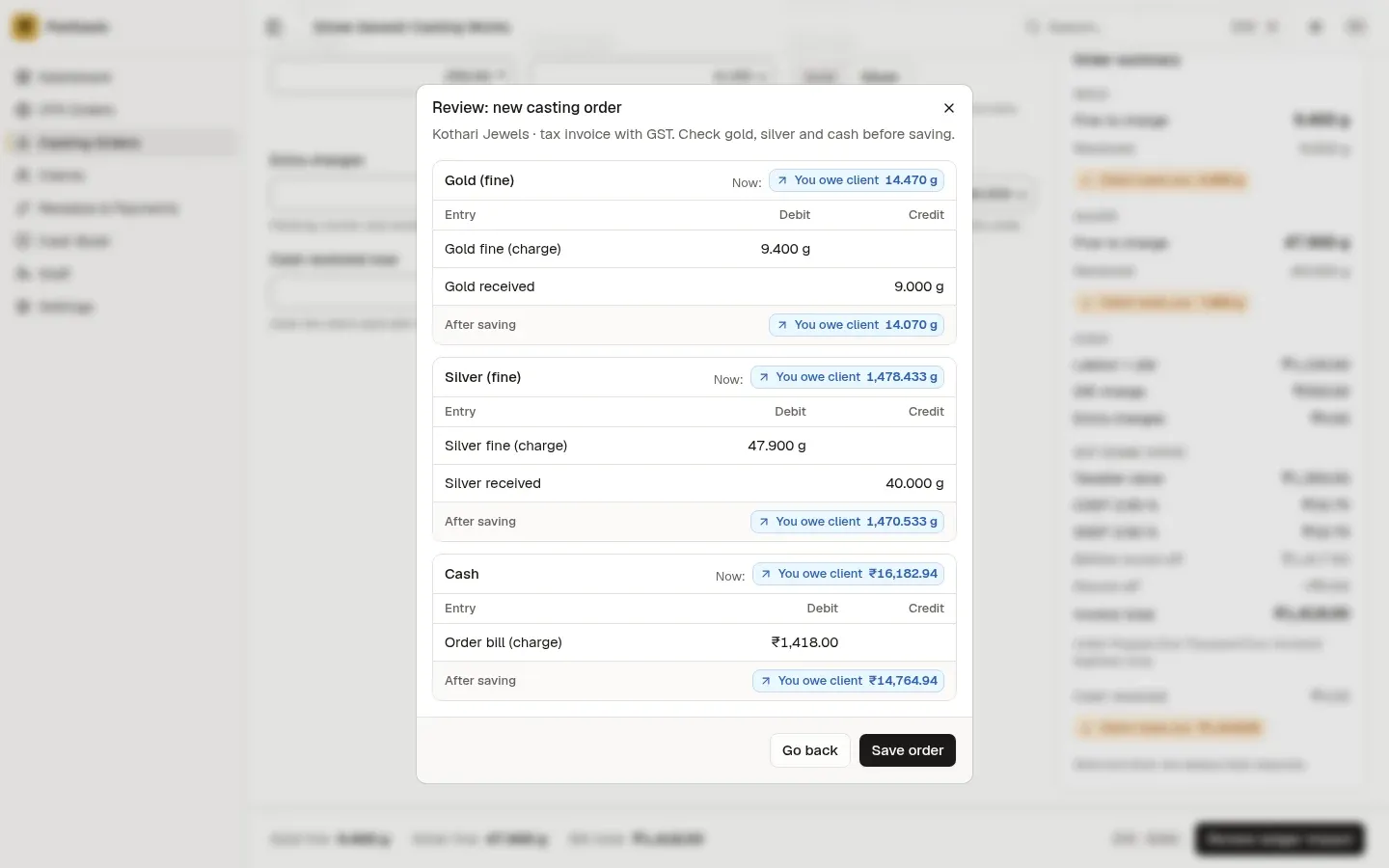
Every casting order shows a review step with each ledger entry. The owner and managers also see the client’s balance before and after the order.
Casting software questions
How does Parthavix work out fine weight?
For each line, fine weight = gross weight × purity + wastage. Wastage can be a percentage of the gross weight or a weight in grams, chosen line by line. DIE wastage is then added to the metal you choose.
Is labour charged on gross weight or fine weight?
On gross weight: amount = gross weight × labour rate per gram + job charge. The default labour rate comes from your settings and can be changed on each line.
What happens to the gold the client gives with the order?
Enter it as gold received. It is credited to the client’s gold balance, separately from the fine gold you charge, so the order shows exactly how much gold the client owes or has in advance.
Can one order have gold and silver lines?
Yes. Gold and silver lines can be mixed in one order. Their fine weights, received metal and balances are always kept separate and never added together.
What if an order was entered wrongly?
Orders are never edited. The owner or a manager cancels it with a reason, which reverses the fine gold, fine silver and bill. Metal and cash received stay with the client as advance, and the review step says so before you confirm.
Bill your next casting order in Parthavix
Set up your purity, wastage and labour defaults once, and every order uses them.
Free during early access. Write to us and a person will reply.
Other features
- 3D wax printing billing software
Per-gram billing for 3D wax and resin printing, with design numbers, extra charges and cash received on the order.
- Gold and silver ledger for jewellers
A khata for every client with separate gold, silver and cash balances, a passbook, receipts and payments.
- GST invoices for jewellery job work
Tax invoices with CGST + SGST or IGST, round-off, amount in words and your bank details, as a PDF.