Attendance and payroll software for jewellery workshops
Attendance and payroll for karigars and staff
Last updated 23 November 2026
Parthavix Workforce runs attendance and payroll for jewellery workshops. Workers mark attendance on their own phone with a selfie, on a shared gate tablet, or the owner marks it; the register fills itself; and payroll works out each salary, advance cut, piece-work amount and PF or ESI line, which the owner can still change with a reason.
Book a free demo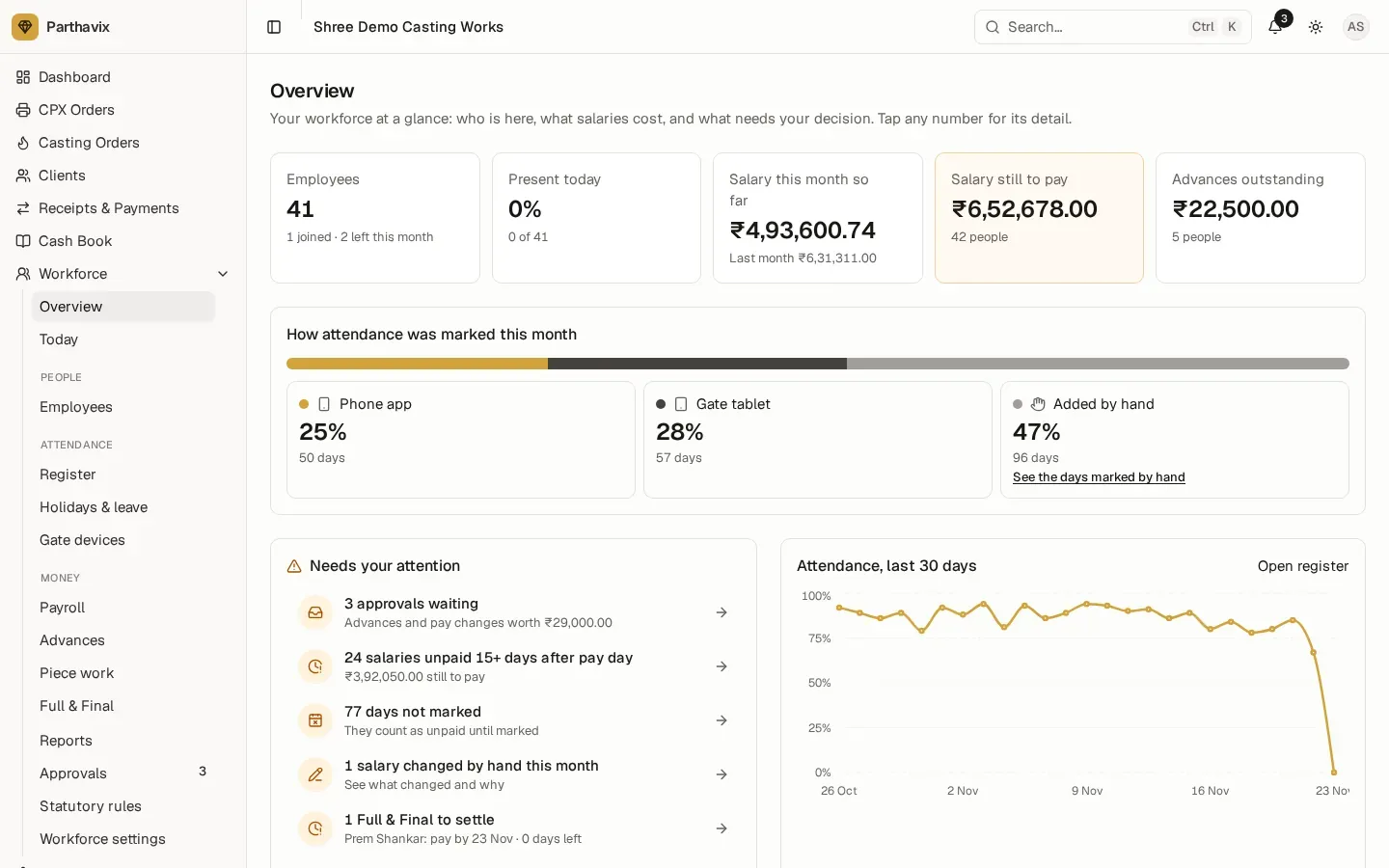
The problem
A haziri register, a calculator and arguments on salary day
Attendance on paper.
The register is filled in late, some karigars have no smartphone, and nobody is sure who came when.
Salary by calculator.
Paid days, piece work, hours, advance cuts and bonuses are worked out again every month.
Advances from memory.
Cash given in the middle of the month is cut later, if someone remembers how much is left.
PF and ESI guesswork.
Wage ceilings, due dates and the portals’ upload files change, and mistakes are costly.
Three ways to mark attendance
Choose for each worker; one workshop can use all three at the same time.
On their own phone, with a selfie
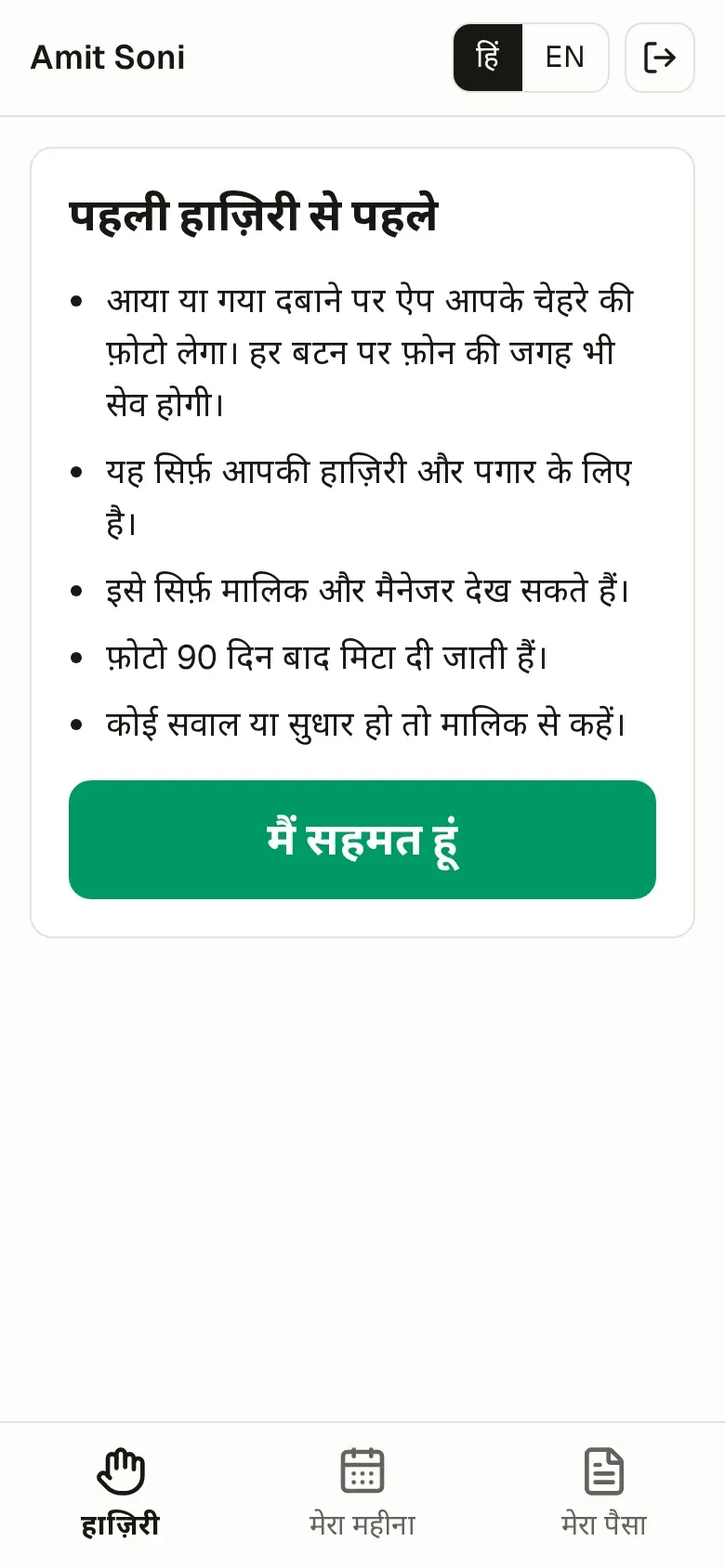
Monthly and hourly workers press Check in on the Parthavix attendance app. It takes a selfie and saves the location at that moment, after a notice in Hindi or English that explains why.
On a tablet at the gate
For karigars without a smartphone. Each one taps their own name tile, and the tablet takes the selfie after 3 seconds.
The owner or a supervisor marks it
“Mark today” lists everyone. Press All present, tap the exceptions and save once. Piece-rate workers are always marked this way.
How Parthavix solves it
Attendance three ways, so nobody is left out
Workshops have karigars with smartphones, karigars without them, and piece-rate workers who come and go. Each can be recorded the way that suits them.
Their own phone, with a selfie and location.
Monthly and hourly workers log in with their mobile number and a 4-digit PIN and press Check in, Break, Back from break or Check out. Check in and check out take a selfie, and every press saves the phone’s location. Away from the workshop is allowed but flagged. Selfie and location can each be switched off.
A gate tablet for workers without a phone.
Pair a tablet at the gate with a one-time code. Workers tap their own tile, with their first name in large type; the front camera takes the selfie after 3 seconds, and a full-screen confirmation shows in Hindi and English. An optional PIN can be asked at the gate.
The owner marks it.
“Mark today” lists everyone: press All present, tap the exceptions and save once. Piece-rate workers do not use the phone app; the owner or a supervisor marks their days. A forgotten check-out can be added by hand with a reason.
No press is ever lost.
With no network, the worker’s phone says “No network. Press again.” and re-sends the same press, so it is never saved twice. Location is taken only when a button is pressed, never in the background, and photos are deleted after 90 days.
Today, and a register like your paper haziri
Who is in today.
The owner opens on today’s counts (in, on break, gone, not come yet, problems), with each person’s check-in photo, time and place in words, such as “At the workshop” or “1.5 km away”. Someone with no press yet is “not come yet”, never “absent”.
The attendance register.
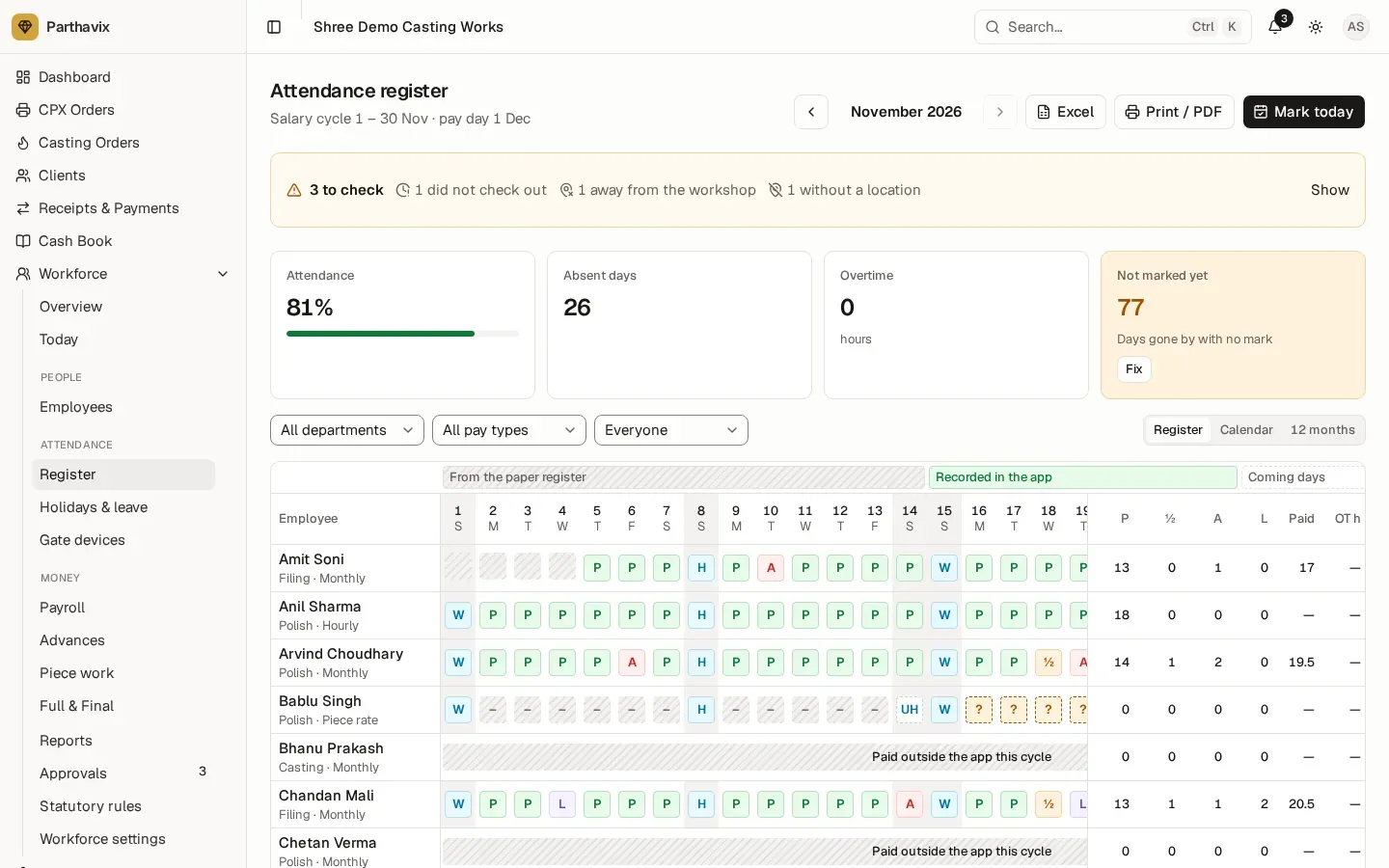
The month as the paper register, with P, ½, A, L, W and H, totals of present days, paid days and overtime hours, and “Not marked yet → Fix”. Mark by keyboard, mark everyone present from a day’s header, or use the calendar view on a phone. Export to Excel or print it.
Bring your old records in.
Start mid-year. Fill earlier days from the paper register, enter totals only, or pay that month outside the app, and add what each worker already owes or has taken as leave.
Payroll where the owner decides
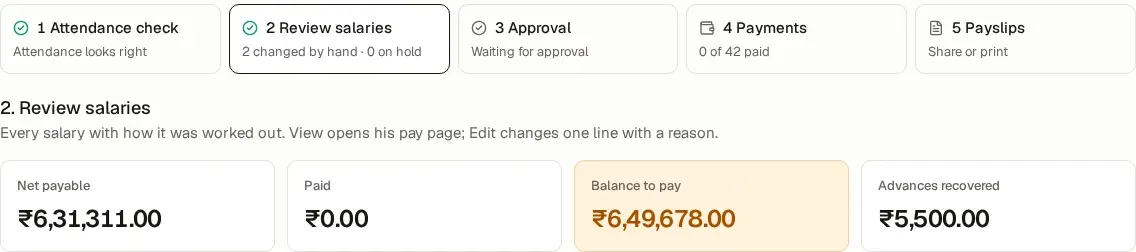
Every amount is worked out for you and explained, and nothing is locked against you. Change paid days, a bonus, a deduction or the total itself; each change asks for a reason and stays in the history.
A pay run in five steps.
Attendance check → Review salaries → Approval → Payments → Payslips. Unmarked days are warnings with a Fix link, never a block.
Pay any amount, any number of times.
Cash, UPI or bank, with a UTR or cheque number. Pay many people in one batch with its own bank transfer file and receipt. Paying more than the balance asks twice.
Payslips in Hindi or English.
Each payslip shows every line with its formula. Share the PDF from your phone, for example on WhatsApp, or send a secure link that opens only that payslip for 30 days.
A paid month never changes.
Once a month has a payment, later changes to rates, rules or PF and ESI settings never touch it.
Advances, piece work and hourly pay
Advances with a recovery plan.
Give an advance by cash, UPI or bank and choose how it comes back: in full from the next salary, a fixed amount a month, or decided each month. A cash advance also shows in the cash book.
Piece work by item.
A list of work items with rates, a worker’s own rate where it differs, and daily entries. The rate is saved with each entry, and the payslip shows piece work item by item.
Hourly workers.
Hours come from check-ins, to the nearest 15 minutes, or are typed in by hand. Overtime is optional.
Increments with arrears
Change a salary by an amount or a percentage, from the day you choose. Parthavix shows what it means before you save, and adds arrears by itself when earlier months are already locked or paid.
An increment letter prints in English or Hindi. “Increment for many” raises a department by a % or the same rupees and shows each person’s old and new pay and the monthly cost change.
| November at full attendance | ₹22,500 |
|---|---|
| 15 days at ₹20,000 a month | ₹10,000 |
| 15 days at ₹25,000 a month | ₹12,500 |
| October difference | ₹5,000 |
|---|---|
| November difference | ₹5,000 |
| Arrears (Oct–Nov) added to December | ₹10,000 |
Holidays and leave
The year’s holidays.
National days in one click, your own days, copy to next year, and swap a day. Declare a holiday today for everyone or a department, full or half day, paid or unpaid; the phone app and gate show it.
Came in on a holiday.
If people already came in, you choose for each one whether the day counts as worked (with nothing extra, a comp-off day or extra pay) or as the holiday.
Leave types and balances.
Paid leave, unpaid leave, comp-off, and earned leave as the law sets it, with everyone’s balance and “Which leave?” when you mark a day.
PF, ESI and professional tax
Switched off until you turn it on, from the salary month you choose. Each amount is worked out from a dated rule with its source, and explained on the pay page and payslip, for example “PF 12 % × ₹22,880 PF wages = ₹2,746”.
Rules in the app (November 2026 rule set, from EPFO, ESIC, the Code on Wages 2019 and the Code on Social Security 2020): the PF wage ceiling is ₹15,000 until 16 Sep 2026 and ₹25,000 from 17 Sep 2026, and a month split by the change is worked out by days; ESI covers wages up to ₹21,000. The app warns when PF (20 employees) or ESI (10 employees) may apply. These amounts are calculated from the current rules with their sources; check them with your CA.
| Employee PF (12 %) | ₹3,000 |
|---|---|
| Employer pension, EPS (8.33 %) | ₹2,083 |
| Employer PF, EPF (3.67 %) | ₹917 |
| Employee ESI (0.75 %) | ₹135.00 |
|---|---|
| Employer ESI (3.25 %) | ₹585.00 |
Government files.
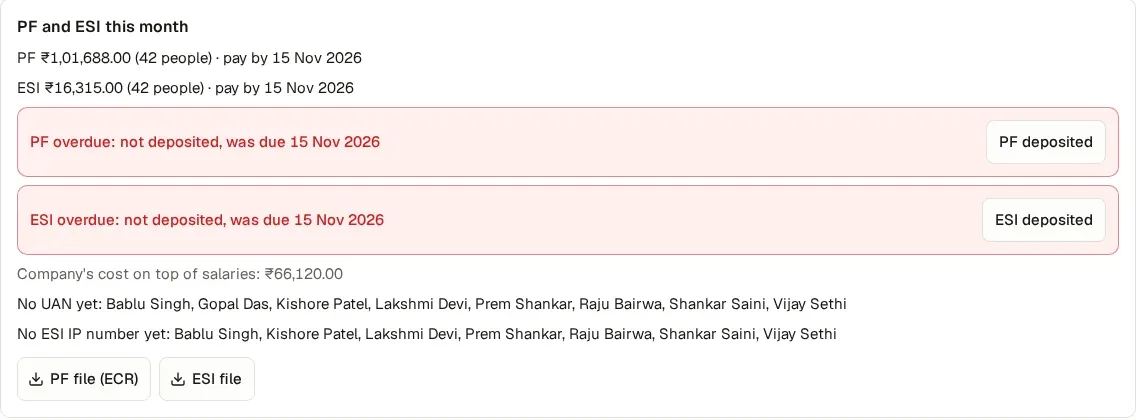
The pay run shows PF and ESI for the month with the pay-by dates, people missing a UAN or ESI number, and the ECR file and the ESI upload file in the portals’ own formats.
Deposits and reminders.
Record each month’s deposit with the date, TRRN or challan and amount. The pay run and Overview remind you before the due date and flag it when overdue.
Professional tax and labour welfare fund.
Choose your states, and PT and LWF are worked out and reported with the rest.
Full & Final and gratuity
Marking someone as left asks for the resignation date, last working day and reason. The Full & Final page shows the pay-by date (final wages within 2 working days of the last working day) and the full statement, and it is paid through payroll.
Gratuity: after 5 years of service (1 year for fixed-term), last wages ÷ 26 × 15 × years, paid within 30 days (Code on Social Security 2020). You decide whether your company pays gratuity; the app warns when the law applies (10 or more employees). The statement also covers salary to the last day, leave encashment, notice pay or recovery, PF and ESI and the advance recovered, with relieving and experience letters as PDFs.
| Years counted (a part year above 6 months is a full year) | 6 |
|---|---|
| ₹26,000 ÷ 26 × 15 × 6 | ₹90,000 |
Roles, approvals and a record of everything
Roles for each job.
Admin, Accountant, Supervisor and Viewer (for a CA or partner), or your own roles with a permission grid. Someone without “see salary” sees no pay anywhere.
Approvals when you want them.
Payroll, advances above an amount, attendance changes in a closed month, pay rate changes, and payments above a person’s own limit wait for approval. Nobody approves their own.
Activity that cannot be edited.
Who did what, to which employee or document, the old and new value, the reason and when. It can be filtered and exported, and nothing in it can be changed or deleted.
Reports, and the worker’s own “My money”
Reports in Excel and PDF.
Salary register, PF with ECR, ESI with the upload file, PT and LWF, attendance muster, leave register, Full & Final register, increment history and cost by department, by month and department.
My money, on the worker’s phone.
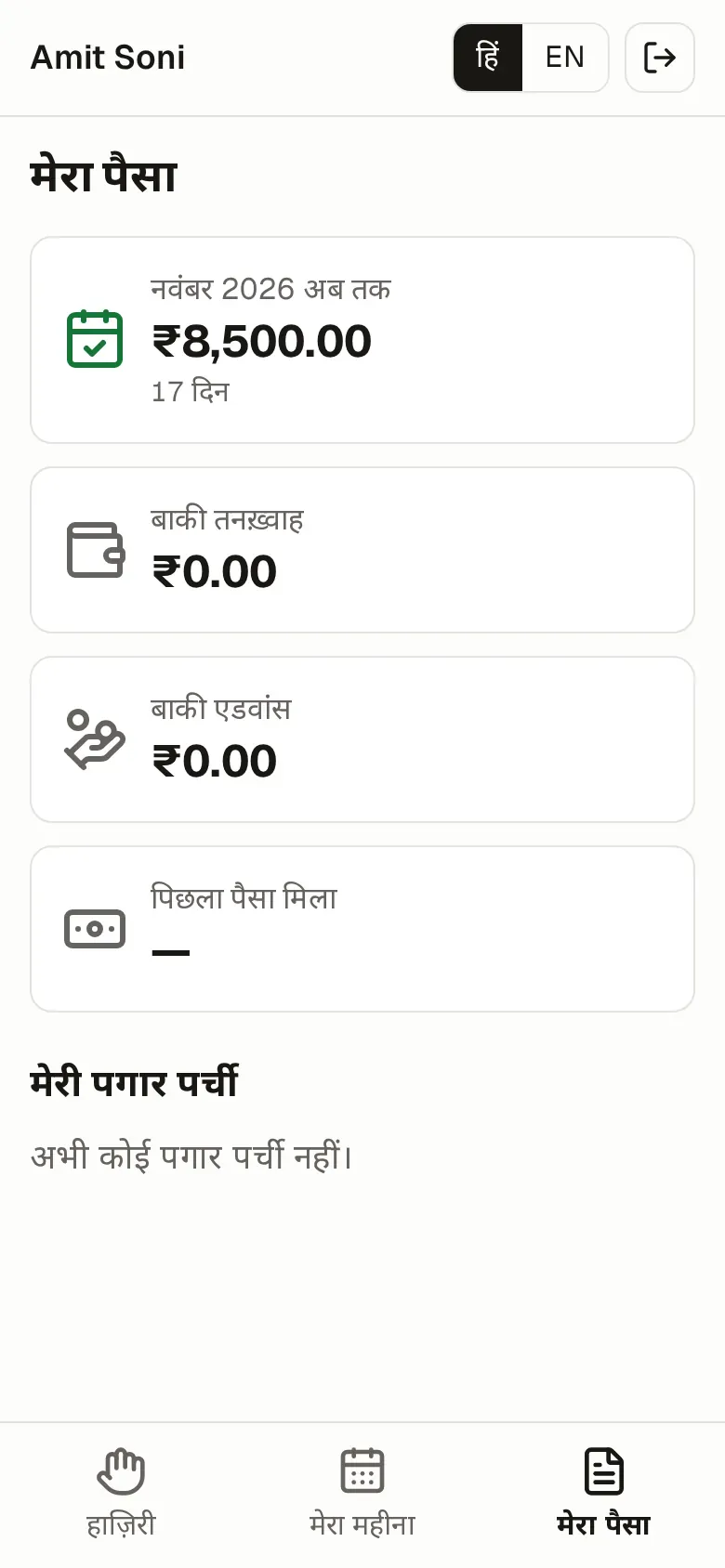
Each worker sees this month so far, salary still to get, advance left, the last payment and their payslips, in Hindi or English.
Overview for the owner.
Present today, salary this month against last month, salary still to pay, advances outstanding, and what needs your attention.
Workforce questions
Can workers mark attendance without a smartphone?
Yes. Put a tablet at the gate and workers tap their own name tile; the tablet takes the selfie. The owner or a supervisor can also mark anyone’s day, and piece-rate workers are always marked this way.
How does selfie attendance work?
The worker opens the Parthavix attendance app on their phone, types their mobile number and 4-digit PIN, and presses Check in or Check out. The app takes a selfie and saves the phone’s location at that moment, and the owner sees the photo and the place in words.
Does the app track workers’ location all day?
No. The location is saved only when the worker presses a button in the app, never in the background. Before the first check-in the app tells the worker, in Hindi or English, what is taken, why and for how long.
Does Parthavix calculate PF and ESI?
Yes, once you switch PF and ESI on. Each amount is worked out from a dated rule with its source, shown with its formula on the payslip, and the pay run gives the ECR and ESI upload files. The amounts are calculated from the current rules with sources; check them with your CA.
Can I change a worker’s salary or paid days in payroll?
Yes. Every number in payroll can be changed by the owner, with a reason that stays in the history. You can also pay any amount, any number of times, and hold a salary.
How are advances recovered?
You choose when you give the advance: in full from the next salary, a fixed amount each month, or decided each month. The payslip shows the cut and what is left.
Can I pay piece-rate karigars?
Yes. Keep a list of work items with rates, enter each day’s pieces, and the salary adds them up item by item. A worker can have their own rate for an item, and the rate is saved with each entry.
How does Full & Final settlement work?
Mark the worker as left with the last working day, and Parthavix prepares the statement with the pay-by date (2 working days for final wages), salary to the last day, leave encashment, gratuity if your company pays it, notice pay and the advance recovered. You settle it through payroll and print the letters.
Can workers see their own salary?
Yes. In “My money” on their phone they see this month so far, salary still to get, advance left, the last payment and their payslips, in Hindi or English.
Put the haziri register on the phone
Book a demo and we will show you attendance and payroll with your own kind of workers.
Guides and how-tos
- Attendance without smartphonesHow to take attendance for karigars without smartphones: owner marking, a shared gate tablet with a selfie, or the phone app, and why not a fingerprint machine.
- Full & Final and gratuityFull & Final settlement and gratuity under India’s labour codes: final wages in 2 working days, gratuity in 30 days, the ÷ 26 × 15 formula and a worked example.
- Gate attendance tabletKarigars without a smartphone can mark attendance on a shared gate tablet. They tap their own name, the tablet takes a selfie and the haziri register fills.
- Karigar advancesGive a karigar an advance by cash, UPI or bank and choose how it comes back. Parthavix cuts it from salary by your plan and shows what is left on every payslip.
- Parthavix vs ExcelA fair comparison of Excel and Parthavix for a jeweller’s metal khata and karigar salary: what a spreadsheet does well, where it slips, and what the app adds.
- Parthavix vs a general payroll appA fair look at a general payroll app and Parthavix for a jewellery workshop: what a general app may suit, and where Parthavix fits karigars and piece work.
- Parthavix vs paper registerA fair look at the paper haziri register and Parthavix for karigar attendance and salary: what paper does well, where it falls short, and what the app adds.
- Piece-rate and hourly payHow to pay piece-rate and hourly karigars correctly: work items and rates, a worker’s own rate, hours to the nearest 15 minutes, overtime and minimum wages.
- PF and ESI in 2026PF and ESI for jewellery workshops in 2026: who is covered, the ₹25,000 PF ceiling from 17 Sep 2026, ESI up to ₹21,000, rates, due dates and a salary table.
- PF and ESI payrollRun PF and ESI payroll in a small jewellery business: switch on from a month, add UAN and ESI numbers, see payslip deductions, and get the ECR and ESI files.
- Piece-rate payrollPay piece-rate karigars without a calculator. Keep work items with rates, a worker’s own rate, daily entries, and a payslip that shows piece work item by item.
Other features
- Gold casting softwareGold and silver casting job work with fine weight from touch and ghat, agreed client terms, labour, DIE wastage and a status board.
- 3D wax printing billing softwarePer-gram billing for 3D wax and resin printing, with resin type, pieces, a minimum charge per piece and a status board.
- Gold and silver ledger for jewellersA khata for every client with separate gold, silver and cash balances, a passbook, receipts and payments.
- GST invoices for jewellery job workTax invoices with CGST + SGST or IGST, round-off, amount in words and your bank details, as a PDF.